
Download TutorEva – AI Homework Assistant for Students (Free, Secure, Update-Ready)
TutorEva is a powerful AI homework assistance tool designed to help students across all academic levels succeed in their studies. Leveraging cutting-edge GPT technology, this innovative platform delivers instant, accurate, and personalized support for assignments, exam prep, and course material understanding. Whether you're tackling complex calculus problems or analyzing Shakespearean literature, TutorEva acts as your 24/7 study partner.
With features like AI CourseMate, DocSolver, and the interactive AI Tutor, it transforms how students learn by providing detailed explanations, verified textbook solutions, and seamless integration through the TutorEva Extension. The software is available for Windows, Mac, Android, and iOS, making it accessible anytime, anywhere. Its secure architecture ensures your academic data remains private and protected.
Regular updates keep the system optimized and equipped with the latest educational resources. Download TutorEva today and experience smarter, faster, and more confident learning.
Key Features of TutorEva: AI-Powered Academic Support
What sets TutorEva apart from other educational tools is its comprehensive suite of AI-driven features, thoughtfully designed to meet the diverse needs of modern students. One of the standout tools is AI CourseMate, which analyzes your course syllabus, lecture notes, and reading materials to generate personalized summaries, flashcards, and study guides. This helps students grasp complex topics faster and retain information more effectively. Whether you're studying biology, economics, or computer science, AI CourseMate adapts to your subject and learning pace.
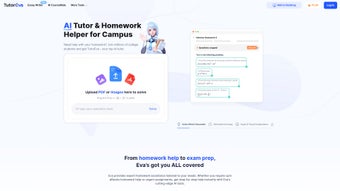
Another powerful feature is DocSolver, which allows users to upload PDFs, images, or scanned documents of their assignments. Within seconds, TutorEva parses the content and delivers step-by-step solutions with detailed explanations. This is especially useful for math, physics, and engineering problems where showing work is crucial. The platform also supports handwritten notes, making it ideal for students who prefer to write out their work before scanning.
The Interactive AI Tutor offers real-time, conversational learning. Instead of just giving answers, it walks you through problems, asks follow-up questions, and adjusts explanations based on your responses. This adaptive learning approach helps build critical thinking and problem-solving skills.
Additionally, TutorEva provides access to a growing library of expert-verified textbook solutions for popular college-level textbooks, ensuring accuracy and reliability. The TutorEva Extension for browsers enhances usability by letting you crop and solve questions directly from your screen—perfect for online lectures or digital textbooks. All features are designed with privacy and security in mind, so your academic work stays confidential.
How to Install and Use TutorEva: A Step-by-Step Guide
Getting started with TutorEva is simple and fast, whether you're on a desktop or mobile device. To download TutorEva, visit the official website and choose your operating system: Windows, Mac, Android, or iOS. The free version offers robust functionality, while premium plans unlock advanced features like unlimited DocSolver uses and priority support.
After downloading, follow the installation wizard—no technical expertise required. On Windows and Mac, simply run the installer and accept the default settings. For Android and iOS, download the app from the Google Play Store or Apple App Store.
Once installed, create a free account using your email or Google/Apple sign-in. The onboarding process takes less than a minute and guides you through setting up your academic profile, including your course subjects, academic level, and preferred learning style. After setup, you can begin using TutorEva immediately. For example, to use DocSolver, open the app, tap the “Upload” button, select your file, and wait for the AI to analyze it. Within seconds, you’ll receive a full solution with explanations.
For the TutorEva Extension, go to your browser’s extension store, search for “TutorEva,” and install it. After enabling, you’ll see a small icon in your browser toolbar. When you encounter a tough question on a webpage, click the icon, crop the text or image, and send it to TutorEva for instant help.
The extension works seamlessly with online learning platforms like Canvas, Moodle, and Blackboard. You can also use the app to schedule study sessions, track your progress, and receive weekly performance reports. Regular updates ensure that the software stays compatible with new operating systems and educational platforms.
Compatibility & System Requirements: Works on All Major Platforms
TutorEva is built with cross-platform compatibility in mind, ensuring students can access their academic support no matter what device they use. The software is fully compatible with Windows 10 and later, macOS 11 (Big Sur) and newer, Android 8.0 and above, and iOS 14 and later. This broad support means you can use TutorEva on laptops, desktops, tablets, and smartphones—perfect for students who study on the go.
For optimal performance, we recommend at least 4GB of RAM and 500MB of free disk space. The app is lightweight and doesn’t slow down your device, even during intensive tasks like document analysis. It also supports both Wi-Fi and mobile data, so you can use it in the library, on a bus, or during a study break. The mobile app includes offline mode for basic features like viewing saved solutions and flashcards, though real-time AI processing requires an internet connection.
Security is a top priority. TutorEva uses end-to-end encryption for all uploaded files and personal data. Your assignments and notes are never shared with third parties or used for training AI models without explicit consent.
The platform complies with GDPR and FERPA regulations, ensuring your academic privacy is protected. Additionally, the software integrates with popular learning management systems (LMS) like Google Classroom, Moodle, and Canvas, allowing for seamless workflow integration. Whether you're a high school student, undergraduate, or graduate learner, TutorEva adapts to your academic journey across all devices and platforms.
Pros and Cons: Is TutorEva Right for You?
- Pros:
- Advanced GPT-powered AI for accurate, detailed solutions
- 24/7 availability—help whenever you need it
- Supports multiple file types: PDFs, images, scanned documents
- Interactive AI tutor encourages deep understanding, not just answers
- Expert-verified textbook solutions for high accuracy
- Browser extension allows quick problem-solving from any webpage
- Secure, private, and compliant with academic privacy laws
- Available on Windows, Mac, Android, and iOS
- Free version offers strong core features
- Cons:
- Advanced features require a paid subscription
- Occasional delays in processing very large documents
- Not a substitute for real classroom instruction
- Some users may need time to adapt to AI-driven learning
- Offline functionality limited to basic features
Frequently Asked Questions (FAQ)
Is TutorEva free to download and use?
Yes, TutorEva offers a fully functional free version that includes core features like AI CourseMate, basic DocSolver, and access to verified textbook solutions. While advanced tools like unlimited document uploads and priority support are available in the premium plan, the free tier is sufficient for most students.
Can I use TutorEva on my smartphone?
Absolutely. TutorEva is available on both Android and iOS. You can download the app from the Google Play Store or Apple App Store and use it on your phone or tablet for on-the-go help with homework and exams.
How secure is my data when using TutorEva?
TutorEva prioritizes security with end-to-end encryption, GDPR and FERPA compliance, and strict data privacy policies. Your uploaded files and personal information are never shared with third parties or used for AI training without your consent.
Does TutorEva work with online learning platforms?
Yes, TutorEva integrates smoothly with major LMS platforms like Canvas, Moodle, Google Classroom, and Blackboard. The browser extension also works directly on these platforms, allowing you to solve problems without leaving your course page.
Can I use TutorEva for exam preparation?
Definitely. TutorEva’s AI CourseMate generates study guides, flashcards, and practice quizzes tailored to your syllabus. The interactive AI tutor also helps you understand difficult concepts, making it an excellent tool for exam review and long-term retention.
Conclusion: Download TutorEva Today for Smarter Studying
If you're a student looking for a reliable, secure, and intelligent study companion, TutorEva is the ultimate AI homework assistant. With its powerful combination of GPT-driven tools, expert-verified solutions, and seamless cross-platform access, it empowers learners to understand, not just complete, their assignments. Whether you're struggling with a tough math problem or preparing for finals, TutorEva delivers instant, accurate, and personalized help 24/7. The free version is feature-rich, and the paid plans offer even more value for serious learners.
Don’t let academic stress hold you back. Download TutorEva today and take control of your learning journey. With regular updates, strong privacy protections, and support across Windows, Mac, Android, and iOS, it’s the smart choice for students who want to study smarter, not harder. Start your free trial now and experience the future of education—one question at a time.



.png)



